


Expense Management Software: Best Tools to Track and Control Business Spending
Managing expenses is one of those areas that tends to get more complicated as a business grows. What starts as a few receipts and a simple spreadsheet can quickly turn into a mix of approvals, reimbursements, and unclear spending patterns. Without a clear system in place, it becomes difficult to understand where money is going or how efficiently it’s being used.
This is where expense management software comes into play. These tools are designed to bring structure, automation, and visibility to business spending, helping owners and teams stay organized without adding more manual work. In this guide, we’ll break down how expense management software can support your business and walk through the best tools available based on your business needs.
Where Is Your Business Money Going? Understanding Expense Management
At its core, expense management is the process of tracking, reviewing, and controlling how money is spent within a business. This includes everything from employee reimbursements and travel expenses to subscriptions, software, and operational costs. While the concept is straightforward, the execution can become complex without the right systems in place.
Many businesses struggle with delayed reporting, inconsistent tracking, and a lack of visibility into spending. When expenses are handled manually, it’s easy for things to slip through the cracks or for insights to come too late to be useful. This is why having a structured approach to expense management is essential, not just for organization, but for making better financial decisions overall.
From Spreadsheets to Smart Tools: What Expense Management Software Actually Does
Expense management software replaces manual processes with a centralized platform that automates how expenses are captured, reviewed, and recorded. Instead of collecting receipts and entering data by hand, employees can submit expenses digitally, often in real time. This creates a more streamlined and consistent process across the entire organization.
These platforms typically combine multiple functions into one system, including expense tracking, approval workflows, reporting, and integrations with accounting tools. The result is a more connected and efficient way to manage business spending. Rather than reacting to expenses after the fact, businesses can monitor and manage them as they happen.
What sets these tools apart is their ability to reduce friction while improving accuracy. By automating repetitive tasks and standardizing workflows, expense management software allows teams to spend less time on administrative work and more time focusing on higher-value activities.
Best Expense Management Software by Business Category
There’s no single “best” expense management software for every business. The right solution depends on the size of your business, how your team spends, and how much visibility or control you need. Some tools focus on simplicity and ease of use, while others are built to support more complex workflows and larger teams. Below is a breakdown of some of the most widely used expense management tools, grouped by what they do best.

Best for Small Businesses: Expensify, QuickBooks, Xero & FreshBooks
For small businesses, the priority is usually ease of use, affordability, and quick setup. Many businesses in this stage are deciding between using their accounting software for expense tracking or adopting a dedicated tool that offers more automation and control. The right choice often depends on how complex your expenses are and whether you need structured approval workflows or just basic tracking.
Expensify
Expensify is one of the most widely used expense management tools for small businesses, largely because it simplifies one of the most frustrating parts of the process: receipt tracking. Its mobile-first design allows employees to scan receipts on the spot, while SmartScan automatically extracts and categorizes the data. This removes the need for manual entry and speeds up the entire expense submission process.
The platform offers a free plan that includes basic functionality like receipt scanning, sending and receiving money, and team chat. For businesses that need more structure, the Collect plan (~$7 CAD per user/month) introduces reimbursements, corporate card management, expense approvals, travel booking, and integrations with QuickBooks and Xero. The Control plan (~$12 CAD per user/month, custom pricing) builds on this with more advanced features like multi-level approvals, custom expense rules, ERP integrations, and enhanced reporting.
Expensify strikes a balance between simplicity and capability, making it a strong choice for businesses that want more structure than spreadsheets but don’t need a full enterprise system.
Top Features
- SmartScan receipt capture
- Expense approvals and reimbursements
- Corporate card support
- Travel booking & policy controls
- QuickBooks/Xero integrations
Best For
- Small to mid-sized businesses
- Teams with frequent employee expenses
- Businesses transitioning from manual processes
QuickBooks Online
QuickBooks Online is primarily an accounting platform, but it includes expense tracking features that make it a practical option for many small businesses. Expenses can be automatically pulled in from bank feeds, categorized, and tied directly to financial reports. This creates a centralized system where business owners can manage both accounting and expenses in one place.
Pricing typically ranges from ~$30 to $220 CAD per month, depending on the plan and features required. While QuickBooks is strong when it comes to financial reporting and bookkeeping, it is not designed as a dedicated expense management platform. It lacks more advanced features like layered approval workflows, policy enforcement, and real-time spend controls that are standard in newer expense tools.
That said, QuickBooks is a strong option if you are already using it for accounting and want to avoid adding another system.
Top Features
- Automated expense tracking via bank feeds
- Expense categorization and reporting
- Invoicing and accounting in one system
- Wide integration ecosystem
Best For
- Businesses already using QuickBooks
- Owners wanting an all-in-one solution
- Teams with simpler expense workflows
Xero
Xero is another accounting-first platform that includes expense tracking as part of its broader offering. It allows businesses to manage expense claims, track spending, and integrate financial data within a single system. This makes it especially useful for businesses that want to consolidate their tools rather than introduce a separate expense platform.
Pricing typically falls between ~$25 and $80 CAD per month, depending on the plan. While Xero does support expense tracking, it does not offer built-in corporate card functionality or the same level of automation found in dedicated expense tools. It works best when used as part of a full accounting setup rather than as a standalone expense solution.
For businesses already using Xero, adding expense tracking can be a convenient way to simplify workflows.
Top Features
- Expense claim tracking
- Accounting and reporting integration
- Multi-user access
Best For
- Businesses already using Xero
- Teams looking to consolidate tools
- Simple expense tracking needs
FreshBooks
FreshBooks is a Toronto-based accounting platform that is particularly well-suited for freelancers and small service-based businesses. It combines invoicing, time tracking, accounting, and expense tracking into a single, easy-to-use system. This makes it a strong option for businesses that prioritize simplicity and client billing over complex financial workflows.
Pricing typically ranges from ~$26 to $72 CAD per month, depending on the plan. While FreshBooks offers expense tracking, it is not designed for advanced spend management. It does not include features like corporate cards, layered approvals, or complex policy controls, which limits its use for larger teams or more structured operations.
For freelancers and small teams, however, it offers a clean and efficient way to manage finances without unnecessary complexity.
Top Features
- Expense tracking
- Invoicing and time tracking
- Simple financial reporting
- User-friendly interface
Best For
- Freelancers and consultants
- Small service-based businesses
- Teams prioritizing simplicity
Key Takeaway: Accounting Tools vs Dedicated Expense Platforms
Accounting tools like QuickBooks, Xero, and FreshBooks can handle expense tracking, especially for smaller businesses with straightforward needs. However, they are not purpose-built expense management systems. They focus on recording and reporting expenses rather than actively controlling and managing spending in real time.
If your business requires structured approvals, corporate card controls, or deeper automation, dedicated expense platforms like Expensify, Ramp, or Float will offer significantly more functionality. The choice ultimately comes down to whether you need basic tracking or a more proactive approach to managing spend.
Best for Corporate Cards & Spend Control: Brex, Ramp, Float, Keep
As businesses grow, many move beyond tracking expenses after they happen and instead focus on controlling spending in real time. This is where corporate card and spend management platforms stand out. These tools allow businesses to set rules, monitor transactions instantly, and reduce the need for reimbursements altogether.
Brex
Brex is built around corporate cards and real-time spend management, giving businesses control over expenses before they happen. Instead of reviewing expenses after submission, finance teams can set policies, track transactions instantly, and automate approvals. This proactive approach helps reduce overspending and improve financial visibility.
Brex offers multiple pricing tiers, including a free entry-level option and more advanced plans with additional features. Its strength lies in combining card issuance, expense tracking, and financial controls into a single platform. This makes it particularly valuable for growing businesses that need more structure without adding complexity.
Top Features
- Corporate cards with spend controls
- Real-time transaction tracking
- Automated approvals
- ERP integrations
Best For
- Scaling businesses
- Finance teams needing control
- Multi-entity organizations
Ramp
Ramp positions itself as an automation-first spend management platform, with a strong focus on helping businesses reduce costs. It goes beyond tracking expenses by identifying inefficiencies and offering insights into where money can be saved. This makes it both an expense tool and a financial optimization platform.
Ramp offers a free plan, which makes it accessible for many businesses, along with more advanced features for larger teams. Its automation capabilities, including receipt matching and policy enforcement, reduce the need for manual oversight. This allows finance teams to focus more on strategy rather than administration.
Top Features
- Expense automation
- Spend insights and savings recommendations
- Receipt matching
- Free pricing option
Best For
- Businesses focused on cost control
- Teams wanting automation-first tools
- Growing companies
Float
Float is a Canadian-built spend management platform designed specifically for small and mid-sized businesses. It combines corporate cards, expense tracking, and approval workflows into a single system, making it easier to manage team spending in real time. Its focus on the Canadian market gives it an edge for businesses looking for localized solutions.
Float offers both free and paid pricing tiers, making it accessible while still scalable. Its integration with tools like QuickBooks and Xero ensures that financial data flows smoothly between systems.
Top Features
- Corporate cards
- Real-time spend tracking
- Approval workflows
- Accounting integrations
Best For
- Canadian businesses
- Teams needing spend control
- Growing SMBs
Keep
Keep is a Canadian platform that focuses on simplifying expense automation through corporate cards and lightweight spend tracking tools. While it does not offer the same depth as full expense management platforms, it provides a streamlined way for businesses to control spending and reduce manual processes.
Its strength lies in its simplicity and accessibility, making it a strong option for smaller businesses or startups that are not ready for more complex systems.
Top Features
- Corporate cards
- Expense tracking
- Simple automation
Best For
- Small businesses
- Startups
- Teams needing lightweight solutions
Best for Enterprise: SAP Concur & Workday
Enterprise-level expense management is less about simple tracking and more about control, compliance, and integration across multiple systems. Larger organizations often need tools that can handle complex approval structures, global operations, and strict financial policies. These platforms are designed to support that level of scale, often connecting expense management with broader financial, HR, and operational systems.
SAP Concur
SAP Concur is one of the most established platforms in enterprise expense management, particularly for organizations that need to manage both travel and expenses in a single system. It allows businesses to automate expense reporting, enforce policies, and gain detailed visibility into spending across departments and regions. This makes it especially valuable for companies with frequent travel or complex reimbursement structures.
One of Concur’s key strengths is its ability to standardize processes across large teams while maintaining compliance. It includes advanced reporting tools, audit capabilities, and integrations with ERP systems, which help ensure that financial data remains consistent and accurate. Pricing is provided on a custom, quote-based model, allowing the platform to be tailored to each organization’s size and needs.
Top Features
- Travel and expense management in one platform
- Advanced reporting and analytics
- Policy enforcement and compliance tools
- ERP integrations
Best For
- Large organizations
- Companies with frequent travel expenses
- Businesses requiring strict compliance and reporting
Workday
Workday takes a broader approach to expense management by embedding it within a full enterprise resource planning (ERP) system. Rather than functioning as a standalone tool, it connects expense management with finance, HR, and procurement processes. This creates a more unified system where data flows seamlessly across different parts of the organization.
Because of its scope, Workday is best suited for organizations that are already operating at scale or planning to unify their internal systems. It offers advanced insights, automation, and reporting, but it also requires a higher level of implementation and customization. Pricing is quote-based and tailored to each business, reflecting the complexity of the platform.
Top Features
- End-to-end spend management
- Integration with HR and finance systems
- Advanced analytics and reporting
- Scalable enterprise infrastructure
Best For
- Large enterprises
- Businesses needing system-wide integration
- Organizations managing complex operations

Best for Global & Multi-Currency: Airwallex & OFX
For businesses operating internationally, expense management goes beyond tracking receipts. It involves handling multiple currencies, managing cross-border payments, and maintaining visibility across different regions. These tools are designed to simplify global financial operations while keeping everything connected.
Airwallex
Airwallex is built for businesses that operate across borders and need to manage both spending and payments in multiple currencies. It combines expense management with global financial infrastructure, allowing businesses to issue cards, track expenses, and manage international transactions from a single platform. This makes it particularly useful for companies scaling internationally.
Pricing includes a free “Explore” plan, with additional tiers such as Grow and Accelerate that offer more advanced features. Its ability to integrate global payments with expense tracking sets it apart from more traditional expense tools.
Top Features
- Multi-currency accounts
- Global corporate cards
- Expense tracking and approvals
- International payment capabilities
Best For
- International businesses
- Companies expanding globally
- Teams managing multi-currency expenses
OFX
OFX focuses on international payments and currency management, making it a strong option for businesses that deal with global suppliers or clients. While it includes tools for tracking spending, its primary strength lies in simplifying foreign exchange and cross-border transactions. This gives businesses better visibility into international financial activity.
Pricing is typically transaction-based or customized depending on business needs. Unlike dedicated expense platforms, OFX is not centered around employee expense reporting but instead provides a broader view of global financial operations. This makes it a complementary tool rather than a direct replacement for traditional expense management software.
Top Features
- Foreign exchange management
- Global payments
- Expense visibility across currencies
- Integration with financial systems
Best For
- Businesses with international payments
- Companies managing foreign exchange
- Teams needing global financial visibility
Best for Automation: Zoho Expense
Automation is one of the biggest drivers behind adopting expense management software, and Zoho Expense is built specifically around this idea. It focuses on simplifying the entire expense lifecycle, from receipt capture to approvals and reporting, using automated workflows. This makes it particularly useful for businesses that want to reduce manual processes without moving into enterprise-level systems.
Zoho Expense offers a free plan along with tiered pricing options, making it accessible for small and growing businesses. It integrates seamlessly with the broader Zoho ecosystem, as well as other accounting tools, which allows businesses to build a connected financial workflow. While it may not offer the same card-based controls as platforms like Ramp or Float, it excels in process automation and ease of use.
Top Features
- Automated expense workflows
- Receipt scanning and categorization
- Approval management
- Reporting and analytics
Best For
- Businesses prioritizing automation
- Teams using Zoho products
- Small to mid-sized companies
Key Features to Look for in Expense Management Software
While each platform offers its own strengths, there are several core features that consistently matter when evaluating expense management software. These features directly impact how efficient and useful the tool will be in day-to-day operations.
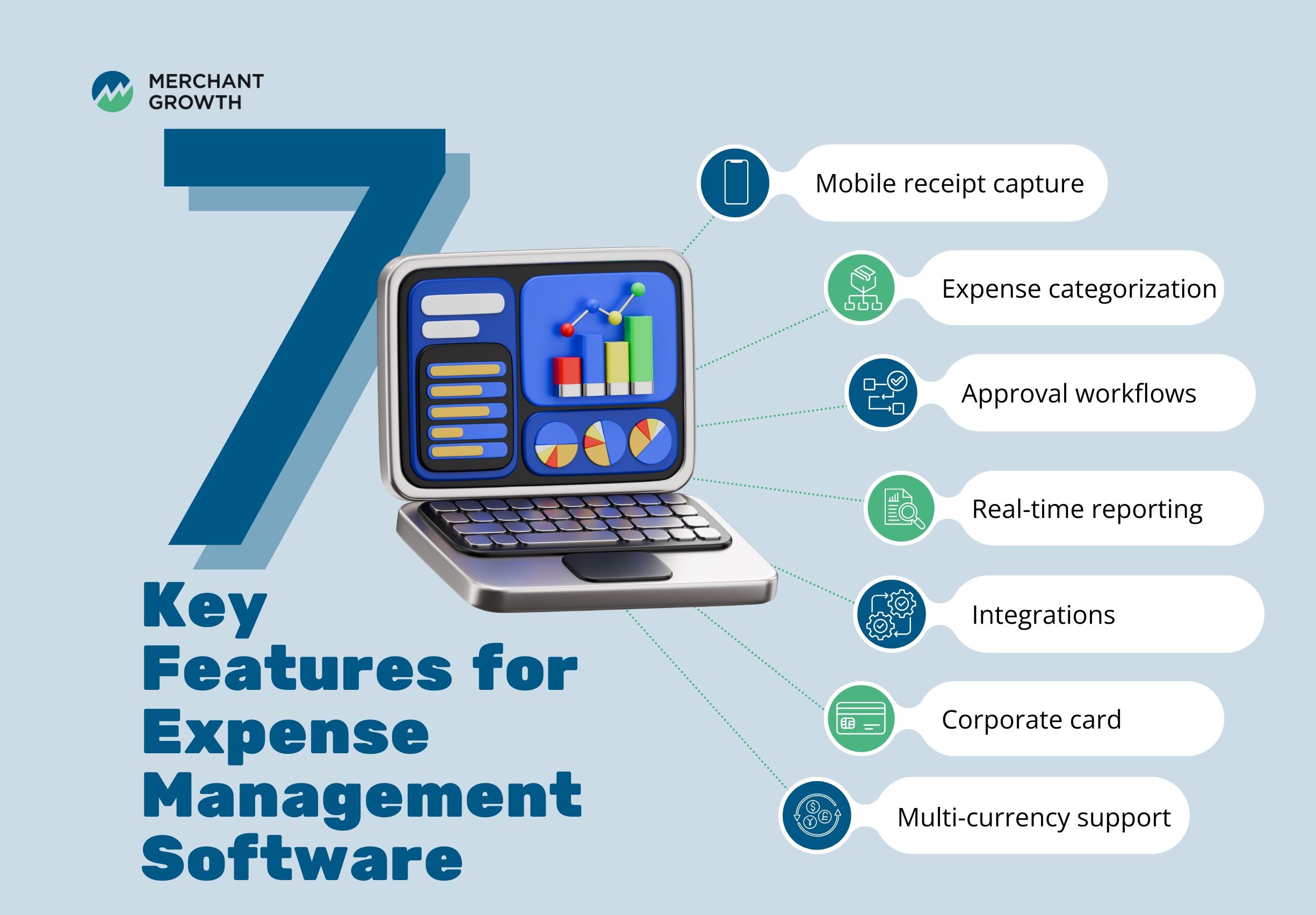
Some of the most important features to consider include:
- Mobile receipt capture, allowing employees to submit expenses quickly
- Automated expense categorization to reduce manual input
- Approval workflows to maintain oversight and control
- Real-time reporting for better visibility into spending
- Integrations with accounting and ERP systems
- Corporate card integration for seamless tracking
- Multi-currency support for global operations
Choosing a tool with the right combination of these features ensures that it aligns with how your business operates, rather than forcing you to adapt your processes to the software.
Benefits of Expense Management Software
Implementing expense management software goes beyond simply organizing receipts. It creates a more structured and transparent way to manage how money moves through your business. Instead of relying on delayed reports or manual tracking, businesses gain immediate visibility and control over spending.
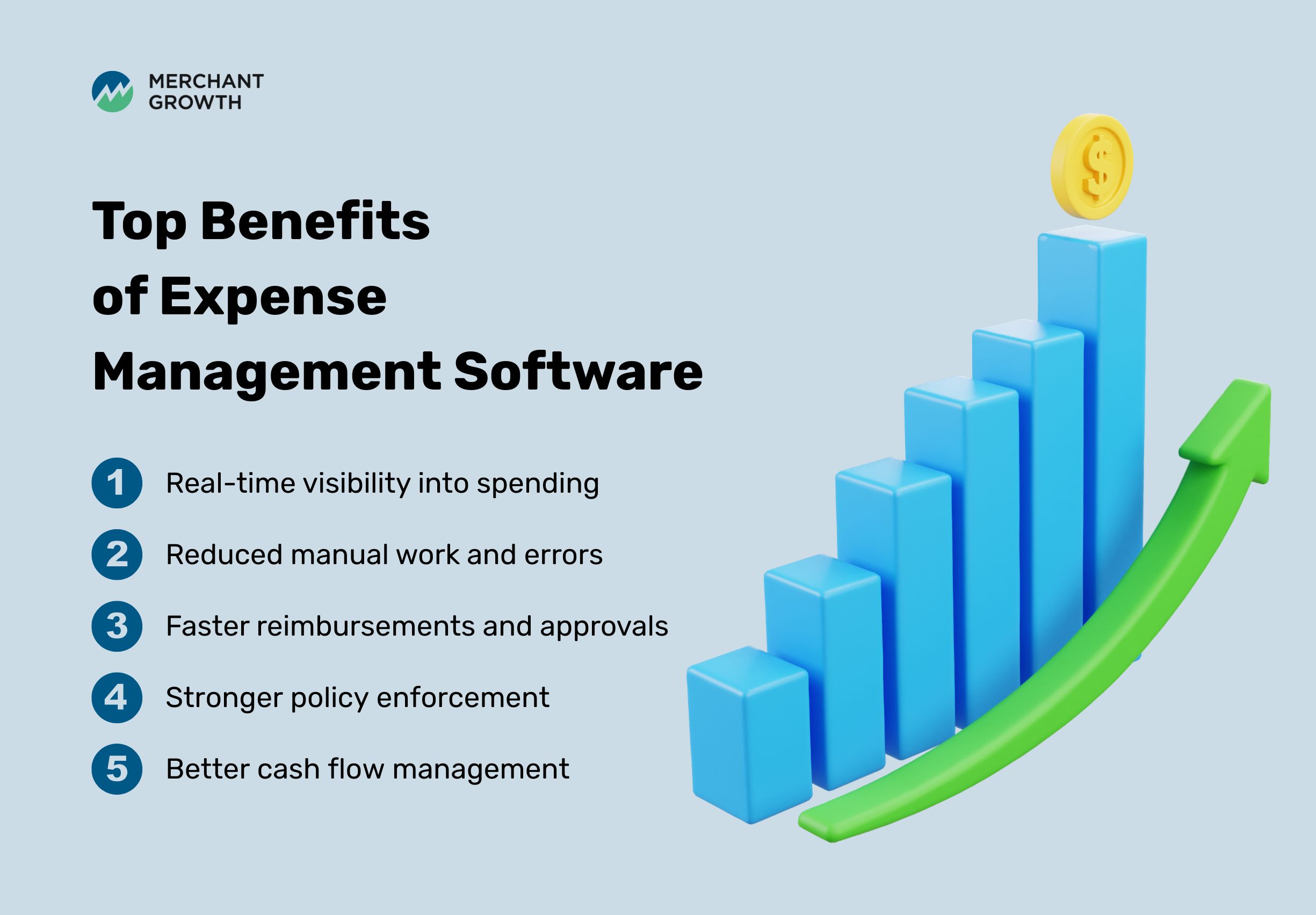
Key benefits include:
- Real-time visibility into spending: See exactly where money is going as expenses happen, making it easier to identify trends and catch issues early.
- Reduced manual work and errors: Automation removes repetitive tasks like data entry and approval routing, improving accuracy and saving time.
- Faster reimbursements and approvals: Streamlined workflows ensure expenses are processed quickly, improving the experience for employees and finance teams.
- Stronger policy enforcement: Set rules and automatically flag out-of-policy expenses, reducing the need for manual oversight.
- Better cash flow management: Clear insights into spending help businesses plan ahead and avoid unexpected shortfalls.
Over time, these improvements lead to stronger financial control and a more proactive approach to managing business finances.
How Expense Management Software Works
Expense management software follows a structured workflow that simplifies how expenses are captured, reviewed, and recorded. While each platform may vary slightly, most systems follow a similar process designed to reduce friction and improve consistency.
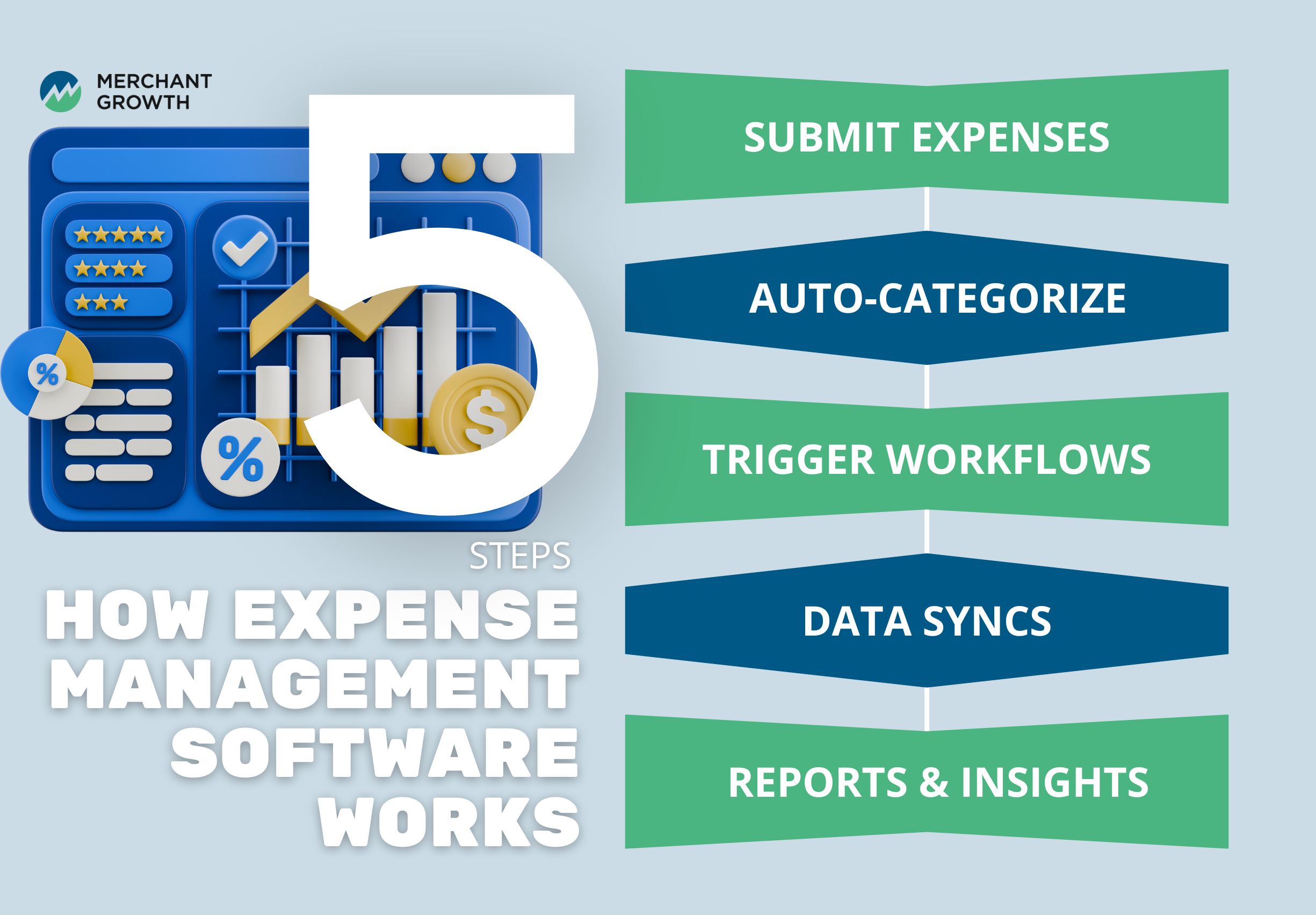
Here’s how it typically works:
- Employees submit expenses: Expenses are submitted through a mobile app or web platform, often by uploading a receipt or linking a transaction directly from a corporate card or bank feed.
- Expenses are automatically categorized: The system uses predefined rules to categorize expenses, reducing the need for manual input and ensuring consistency across records.
- Approval workflows are triggered: Managers review submitted expenses and either approve or flag them based on company policies.
- Data syncs with accounting systems: Once approved, expenses are automatically recorded in accounting software, keeping financial records accurate and up to date.
- Reporting and insights are generated: Businesses can then access dashboards and reports to analyze spending patterns and make informed decisions.
This structured workflow replaces fragmented, manual processes with a centralized system, making expense management more reliable and scalable as a business grows.
How to Choose the Right Expense Management Software
Choosing the right expense management software starts with understanding your business needs. A small team with simple expenses may prioritize ease of use, while a larger organization may need more advanced features and controls. Matching the tool to your level of complexity is key.
It’s also important to consider how the software integrates with your existing systems. A platform that connects seamlessly with your accounting tools will save time and reduce the risk of errors. Ease of adoption is another critical factor, as even the best software won’t deliver value if it’s not used consistently.
Finally, consider how the tool will scale with your business. As your operations grow, your expense management needs will likely become more complex. Choosing a solution that can evolve with you helps avoid the need for frequent changes down the line.
Why Expense Management Software Matters for Small Businesses
For small businesses, managing expenses efficiently can have a direct impact on cash flow and overall financial health. Without clear visibility, it’s easy for costs to add up or for inefficiencies to go unnoticed. Expense management software provides a structured way to stay on top of spending without adding extra workload.
It also creates a foundation for growth. As a business expands, having consistent processes in place makes it easier to scale operations without losing control. This allows owners to focus more on growth opportunities and less on day-to-day financial administration.
Choosing the Right Tool for Your Business
Expense management software is not just about tracking spending, it’s about creating a system that supports better financial decisions. The right tool can help you stay organized, reduce manual work, and gain clearer insight into how your business operates.
Ultimately, the best solution is the one that fits your current needs while allowing room for growth. By focusing on usability, integration, and scalability, you can choose a platform that supports both your day-to-day operations and your long-term goals.
How Merchant Growth Supports Your Financial Operations
Managing expenses is one part of building a strong financial foundation, but having access to capital is just as important. Merchant Growth provides flexible funding solutions that help Canadian businesses manage cash flow and invest in growth opportunities. By combining better expense management with the right financial support, businesses can make more confident decisions and operate with greater stability.
Additionally, Merchant Growth customers have access to additional business tools through Merchant's Market, our exclusive customer marketplace. Some of the expense management and spend control platforms discussed in this guide are available through Merchant's Market, making it easier for existing customers to discover solutions that support their day-to-day operations. Explore exclusive partner discounts in Merchant’s Marketplace by logging into your Client Portal today.